Newton's second law, F = ma, predicts the future
motion of an object if we know its initial motion and the net force that is
acting on the object. Today you will explore this
motion when the net force is approximately constant.
Equipment needed:
Tennis ball
Track
Wood block
Digital balance
Rulers
Smart Cart
Open a Microsoft Word document to keep a live journal of your experimental
procedures and your results. Include all deliverables, (data, graphs,
analysis, outcome). Write a 'mini-reflection' immediately after
finishing each investigation, experiment or activity, while the logic is
fresh in your mind.
Free-fall - The acceleration of gravity
Gravity is the force of nature we are most aware of.
One can argue that other forces, such as
the electromagnetic force, which holds molecules together in solid objects, or nuclear forces, which determine the structure of atoms, are more important,
but these forces are less obvious
to us. Near the surface of Earth the force of
gravity on an object of mass m equals Fg = mg. It is
constant and points straight down. If we can neglect other forces and the
net force is approximately equal to Fg, then we have motion
with constant acceleration g.
Observation
Hold a tennis ball at about your height and then let go. Observe the
motion of the ball.
Describe the motion as the ball is falling.
Estimate how long it takes the ball to reach
the floor.
What can you say about the speed of the ball
as a function of the distance it has already fallen?
If you drop the ball from about half of your
height, does it take approximately half the time to reach the floor?
Experiment 1: Tracking a freely falling object
It does not take the ball a long time to reach the floor.
It is hard to get detailed information about its motion without using external
measuring instruments. In this experiment, the instrument is a video
camera. You will analyze a video clip. The clip shows a ball being
dropped. You will determine the position of the freely-falling
ball as a function of time by stepping through the video clip frame-by-frame and
by reading the time and the position coordinates of the ball off each frame.
You will construct a spreadsheet with columns for time and position and use this
spreadsheet to find the velocity as a function of time. The slope of a
velocity versus time graph yields the acceleration of the ball.
Procedure:
To play the video clip or to step through it frame-by-frame click the "Begin"
button.
"Play" the video clip. When finished, "Step up" to
frame 1. In some browsers you have to click "Pause" first.
In the setup window, choose to track the y-coordinate of an
object.
Click "Calibrate". Then click "Calibrate Y". The video clip contains
a meter stick. Position the cursor over bottom end of the stick and click the left mouse button. Then position the cursor
over the top end of the stick and click the left
mouse button again. This will record the y-coordinates of the chosen
positions. Enter the distance between those positions into the text box in
units of meter. For the example positions, you would enter 1 into the
text box. Click "Done".
Make sure the video frame stays fixed in the browser window between the two
clicks. You may have to scroll after the clicks to get to the buttons.
Click the button "Click when done calibrating". A spreadsheet
will open up. Click "Start taking data".
Start tracking the ball. Position the cursor over the
ball. When you click the left mouse button, the time and the y-coordinate
of the ball will be entered into the spreadsheet. You will automatically
step to the next frame of the video clip. Make sure the video frame stays
fixed in the browser window while you take data.
Repeat for each frame in the video clip until the ball reaches the bottom end
of the meter stick. Then click "Stop Taking Data". Highlight and copy your table. Open Microsoft Excel, and paste the table
into an Excel spreadsheet. Depending on your browser, you may have to use
"Paste" (Edge) or "Paste Special, Unicode Text" (Chrome). Your spreadsheet will have two columns, time (s)
and y (m). If you followed the instructions above, the the y-axis points
up.
Produce a graph of position versus time.
Label the axes.
Describe your graph. Does it resemble a
straight line? If not, what does it look like?
Was the ball moving with constant velocity?
How can you tell?
For motion with constant acceleration we expect that y changes as a function
of time as y = y0 + v0t + ½at2, where a is the
acceleration. For an object accelerating at a constant rate g we have y = y0 + v0t
+ ½gt2,
so y as a function of t is a polynomial of order 2 (a section of a parabola).
We can reduce numerical errors in finding the acceleration of the ball by
fitting our position versus time data directly with a polynomial of order 2.
Right-click the data in your position versus time graph and choose "Add Trendline".
Choose Polynomial, Order 2 and under options click "Display equation on
chart". An equation of the form y = b1x2 + b2
x + b3 will be displayed where b1, b2, and
b3 are numbers. Since we are plotting y versus t, the number b1 is the best
estimate for g/2 from the fit. Therefore the value of the acceleration
determined from the fit is g = 2b1. Since our y-axis points
upward, we expect a to be close to g = -9.8 m/s2.
Does the polynomial of order 2 fit the data well?
What value do you obtain for the acceleration of the ball from this fit?
After collecting your time and position data, provide your table of data to
an AI with this prompt: 'I have table with columns "time" and "y-position" for a
falling ball. Write a Python script using Matplotlib to calculate velocity, plot
y vs y and y vs y, and find the acceleration using a linear fit on the velocity
data.' Run this code in Google Colab. How does the AI's acceleration
value compare to your Excel trendline? Which method was more prone to
error?
Experiment 1 Deliverables:
(to be included in the your journal)
Visuals: Labeled
plot of position versus time (Excel, including trendline)
and of velocity versus time (AI generated).
Analysis: Compare the two fits. Do they produce the
same value for the acceleration? How do these values compare to the
accepted value for g. What are some possible sources of error?
Outcome: The value(s) you obtain from the fits for the
acceleration of the ball.
Projectile motion
Experiment 2: Tracking an object moving in two dimensions
A ball is moving in two dimensions under the influence of a constant
gravitational force.
It is hard to get detailed information about its motion without using external
measuring instruments. In this experiment, the instrument is a video
camera. You will analyze a video clip. The clip shows a ball being
thrown. You will determine the position of the ball in two
dimensions as a function of time by stepping through the video clip
frame-by-frame and by reading the time and the position coordinates of the ball
off each frame. You will construct a spreadsheet with columns for time and
position and use this spreadsheet to find the x and y component of the velocity
as a function of time.
Procedure:
To play the video clip or to step through it frame-by-frame click the "Begin"
button.
"Play" the video clip. When finished, "Step up" to frame 1.
In the setup window, choose to track both
coordinate of the object.
Click "Calibrate".
Click "Calibrate X".
The video clip contains
two meter sticks. Position the cursor over left end of the horizontal stick and click the left mouse button. Then position the cursor
over the right end of the horizontal stick and click the left
mouse button again. This will record the x-coordinates of the chosen
positions. Enter the distance between those positions into the text box in
units of meter. For the example positions, you would enter 1 into the
text box. Click "Done".
Make sure the video frame stays fixed in the browser window between the two
clicks. You may have to scroll after the clicks to get to the buttons.
Now click "Calibrate Y".
Position the cursor over bottom end of the vertical stick and click the left
mouse button. Then position the cursor over the top end of the vertical
stick and click the left mouse button again. This will record the
y-coordinates of the chosen positions. Enter the distance between those
positions into the text box in units of meter. For the example positions,
you would enter 1 into the text box. Click "Done".
Make sure the video frame stays fixed in the browser window between the two
clicks.
Click the button "Click when done calibrating". A spreadsheet
will open up. Click "Start taking data".
Start tracking the ball. Position the cursor over the
ball. When you click the left mouse button, the time and the x- and y-coordinates
of the ball will be entered into the spreadsheet. You will automatically
step to the next frame of the video clip. Make sure the video frame stays
fixed in the browser window while you take data. When the ball is caught, click "Stop Taking
Data".
Your table will have 3 columns, time (s), x( m), and y (m).
Open Microsoft Excel, and paste the table into an Excel spreadsheet.
Produce graphs of the x and y components of position versus time.
Label the axes.
Describe the graphs. Does one of the graphs resemble a
straight line? If yes, what does this tell you?
Right-click your data in the x(m) versus time graph and choose
"Add Trendline". Choose "Type, Linear" and "Options, Display equation on
chart". An equation y = ax + b will appear on your graph, where the
number a is the slope and the number b is the y-intercept. What is
the physical meaning of the slope of this graph?
Right-click the data in your y(m) versus time graph and choose "Add
Trendline". Choose Polynomial, Order 2 and under options click "Display equation on
chart". An equation of the form y = b1x2 + b2
x + b3 will be displayed where b1, b2, and
b3 are numbers. What do the
coefficients b1 and b2 tell you?
We can view the motion of a projectile as a superposition of two
independent motions. Describe those two motions.
Experiment 2 Deliverables:
(to be included in the your journal)
Visuals: Labeled
plots (including trendline) of x and y components of position versus
time.
Analysis: What do the plots of the x and y components of
position versus time tell you about the motion of the ball?
Outcome: Your experimental value of the horizontal
component of the elocity and the vertical component of the acceleration.
Experiment 3: Measuring the coefficient of static and kinetic
friction
In this session you will measure the coefficient of static
friction for a wood block and a felt-covered block in contact with a metal
track. The surface of the track makes an angle θ with the horizontal.
For angles θ > θmax the block will accelerate down the sloping
track.
You will determine the angle θmax for which the maximum force of
static friction fs_max = μsN = μsmg
cosθmax just cancels the
component of the gravitational force fg = mg sinθmax
pointing down the track. You will then solve for the coefficient of static
friction μs.
You have a track, a wood block, a scale, and two rulers.
Determine the mass of the block using the electronic balance
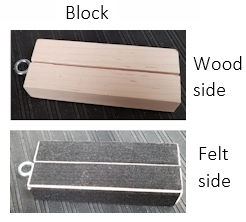
Place the block on the track, with either the wood or the felt side touching
the track. Slowly increase the angle the track
makes with the horizontal. Measure the angle the track makes with the
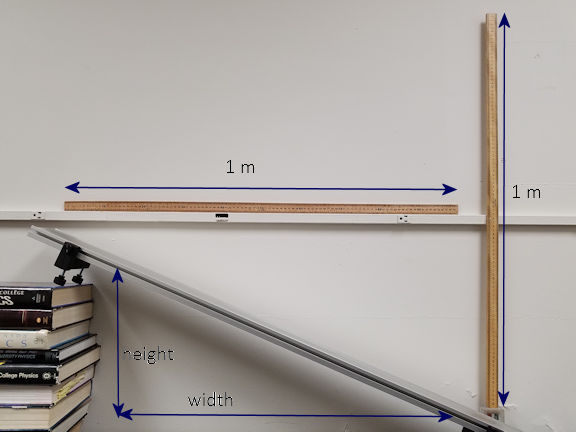
horizontal at which the block starts to accelerate. Use the rulers to measure the width and height of a triangle
and use tanθ = height/width. You can also use an app on your phone to
measure the angle. I recommend that you install the app PhyPhox on your smartphone (iPhone or Andoid).
It gives you access to most of the sensors in your phone and has setups for many
experiments.
Determine μs for the wood block and the felt-covered block.
Construct a table as shown below.
surface
θmax (deg)
μs
wood
felt
Measure μs for the wood block
and the felt-covered block using a different method.
Put the block on the horizontal track on the table, with either the wood
or the felt side touching the track.
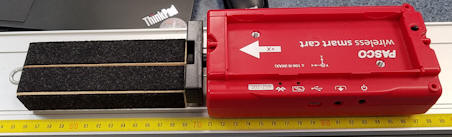
Turn on your Smart Cart with the magnetic bumper attached to the
force-sensor side. In Capstone, add it to your devices under Hardware
Setup. Choose to measure Force (N).
Create a Graph Display by dragging the Graph icon onto the main display.
Select Force, (N) for the y-axis and time (s) for the x-axis.
Zero the force sensors.
Start taking data.
Gently push the cart with the bumper side against the block.
Increase the force until the block starts to move and then move it very
slowly for a short amount of time. Repeat a few times. Make sure
the force sensor reads zero when you are not pushing.
What is the maximum force you have to apply to the block, with
the wood side touching the track, to start it moving?
What is the maximum force you have to apply to the block, with the
felt side touching the track, to start it moving?
fs_max/N = fs_max/(mg) = μs.
What values do you obtain from this experiment for the coefficient of static
friction μs for a wood block and a felt-covered block in contact with a metal
track?
Experiment 3 Deliverables:
(to be included in the your journal)
Analysis: Explain how you measured the
angle θmax. Comment on your results.
Compare the values μs obtained from the two measurements.
Are they close? Are they very different? Should they be the
same?
Describe your
experimental setup to an AI. Prompt: 'I measured a static friction
coefficient of [your value] for wood on metal. What environmental
factors (humidity, surface roughness, track material) could explain why this
differs from the standard value of 0.4?' Incorporate the AI's insights
into your analysis.
Outcome: Table of θmax and μs
for wood and felt.
Convert your journal into a lab report.
Name: E-mail address:
Laboratory 3 Report
Make sure you completed the entire lab and answered all parts. Make
sure you show your work and inserted and properly labeled relevant tables
and plots in your journal.
Add a summary reflection at the end of your report in a short essay format.
Save your Word document (your name_lab3.docx), go to Canvas, Assignments, Lab
3, and submit your document.